Welcome to Class - You got this today!!!
Step 1: Today we need to finish up the last activity on the Multiview assignment that you put into your Engineering Notebook at the end of class yesterday. If you need help the guest teacher has the key she can offer some helpful hints. Turn in your completed sheets into the 7th period bin in the back of the room by my desk.
Step 2:Then you need to get on your Chromebook and go to Project Lead the Way. Click HERE to go to the website.
- Then log into project lead the way. Once you are logged in you need to click on the COURSES and then INTRODUCTION TO ENGINEERING DESIGN.
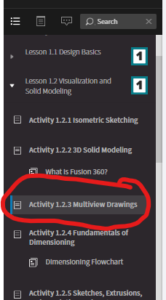
- Click on Lesson 1.2 Visualization and Solid Modeling and then on Activity 1.2.3 Multiview Drawings, see picture below if you get lost:
- In the activity scroll down until you get to the topic LINE CONVENTIONS and read through this section clicking on the blue words for more info.
- Read down until you get to number 5 question where it asks you to:
- Quickly (five minutes) sketch a Multiview of the arch construction block shown in Figure 10. You need to include ONLY the following items on your Multiview
- object lines-solid dark line of your object
- hidden lines-dashed line to indicate a side you cannot directly on the view you are sketching.
- You will sketch your Multiview drawings on orthographic paper(regular graph paper), you can get the paper from the guest teacher.
- Remember to include you the front view, top view, and right side view, and your name on the bottom of the page. Turn in to the back bin when you are done.
- Quickly (five minutes) sketch a Multiview of the arch construction block shown in Figure 10. You need to include ONLY the following items on your Multiview
Step 3: Last you get to have some fun with Isometric Drawings
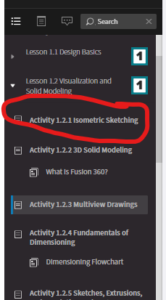
- Now in PTLW on your Chromebook click on the activity 1.2.1 Isometric Sketching, see pic below:
- Once in the activity scroll all the way down to the end of the lesson to the part that says: GOING BEYOND
- You are going to make some Isometric sketches of blocks. Get a piece of Isometric paper (funny looking paper where the boxes are at a 30 degree angle) from the guest teacher.
- Look at the example pictures and choose which letter combination you want to work with and create!
- If you finish turn into the bin the back, if you do not finish put the paper in your engineering notebook and for tomorrow's class
Pick up your Engineering notebooks and it to the guest teacher. Then help stack the chairs before class ends.
Thank you so much for your hard work today!!!
Mrs. Moore