Q3 Spring 2025

Week 18 | January 6th - January 10th | Edit Week 1 - Rotate Days / Change Dates or Style [must be logged in]


Welcome to Class! 

View Full Page

Welcome to Class! 

  • Lots of Projects Happening!!
  • If you are not working on an "Approved Project" please be in Pluralsight - working on A+
  • remember, Mrs. LaMarche can see your progress and time on task in Pluralsight.
  • Each day, please write in your "What I Did Today" - these logs need to reflect accurate and actual work

View Full Page

Welcome to Class!!  

  • Welcome to 2025
  • Lots of projects happening
  • Check in with your Portofolio to make sure you have the correct weeks
  • New Tour a facilities

File:Snowman New Year card.gif - Wikimedia Commons

View Full Page
Week 19| January 13th - January 17th | Edit Week 2 - Rotate Days / Change Dates or Style [must be logged in]

Welcome to Class! 

  • Lots of Projects Happening!!
  • If you are not working on an "Approved Project" please be in Pluralsight - working on A+
  • remember, Mrs. LaMarche can see your progress and time on task in Pluralsight.
  • Each day, please write in your "What I Did Today" - these logs need to reflect accurate and actual work

View Full Page

Welcome to Class!  REMINDER: Mrs. LaMarche will be back Wednesday!

  • Lots of Projects Happening!!
  • If you are not working on an "Approved Project" please be in Pluralsight - working on A+
  • remember, Mrs. LaMarche can see your progress and time on task in Pluralsight.
  • Each day, please write in your "What I Did Today" - these logs need to reflect accurate and actual work

View Full Page
Week 20 | January 20th - January 24th |  Edit Week 3 - Rotate Days / Change Dates or Style [must be logged in]
Welcome to Class!! 

Today we are headed to S-Building!!!

Today we are starting with a Fusion 360 activity.

Click HERE for access to this activity in this week's slide show. Please go to slides 29 and 30

Follow the instructions on slides 29 and 30. Ask Mrs. Moore if you have any questions.


View Full Page

Welcome to Class! 

First 15 Minutes

  • Finish anything for your project presentation: Slides, who will say what, etc.
  • Get Week 2 filled out and completed in your portfolio and start week 3.
    • You can make sure that your project slides are attached to week 3 on today's day Monday 17th.
    • Click HERE to see my example portfolio to see how your portfolio should look
  • Free time for a few minutes, check out the Exploratorium on mrsmoore.org or firstinsprires.org 


Present Projects

  • Each group will take time to present their slides and their fling machine to the class.


Data Analysis: Accurate, Precise, or Both?

  • Using our data to on the target to calculate distance from the center of the target.
  • Is our data showing that our fling machine is accurate, precise, or both?


View Full Page

Welcome to Class! 

  • Info or link to information
  • Info or link to information
  • Info or link to information


View Full Page
Week 21| January 27th - January 31st |  Edit Week 4 - Rotate Days / Change Dates or Style [must be logged in]

Welcome to Class!! - Group #2 starts at the front tables 

Today is about teamwork and helping others!

  • Move the stream table lab from Moore's room to Greenwood's room
  • Load up the cart, supplies and PA system for Bionic Bruins Team
  • Team Building Activity


View Full Page

Welcome to Class!

Today we will start class with 15 mins to finish yesterday's assignment and make sure week 3 is done (see yesterday's tab for what you need).

  • Click HERE to access the slides 5-6 to do your 2nd sketch in Fusion 360
  • Make sure both the hand drawn sketch and fusion 360 sketches are done, put into a Google doc
  • Then Link that document to your Portfolio under yesterday's date.


We will then meet back at the tables to discuss sketching and practice our hand sketches in our notebooks for the last half of class.


View Full Page

Welcome Back!! - We will be in S-Building today starting in the back room.

  • I hope everyone had a restful weekend!


  • Today we will be learning about sketching. How are sketches used and what are some tips when creating sketches!    Get ready to DRAW!!!
    • Click HERE to access the slides 7-8 to do your 2nd sketch in Fusion 360


Before you leave check your Portfolio for last week:

    • Days Mon -Fri  with what you did each day
    • Slides for project on Tues or Thurs
    • Data and questions on Thurs
    • Click HERE if you need to refer to my example portfolio
    • Set up Week 4 in your portfolio.

View Full Page
Week 22 | February 3rd - February 7th |  Edit Week 5 - Rotate Days / Change Dates or Style [must be logged in]

Welcome to Class! 

View Full Page

Welcome to Class! 

View Full Page

Welcome to class!  Please start at the front tables.

Today we are going to learn about how to select a FRONT VIEW of an object and then practice sketching using the guidelines from PLTW.

  • You will be choosing 3 objects to sketch in your engineering notebook
  • Pick one object to sketch in FUSION 360
  • Put both pictures on a Google Doc and and link this document to your Portfolio for Monday.


View Full Page
Week 23 | February 10th - February 14th | Edit Week 6 - Rotate Days / Change Dates or Style [must be logged in]

Welcome to Class! Please excuse Mrs. Moore

Today we are working to finish our reverse engineering project. You need to finish the structural analysis section of the project.

Here are the links you need for this project:

  • Click HERE to open the document that you will need to make a copy of for yourself so that you can work on the project this week.
  • Click HERE for an example of a reverse engineering project that you can use as a reference to help you complete this project.

If you get done with all of your project you need to update your portfolio to finish the week.

Click HERE to see my example portfolio with week 6 completed. Please add your Reverse Engineering document to your Friday description.

View Full Page

Welcome to Class - Please excuse Mrs. Moore

Today you need to class by completing the Multiview review packet that the guest teacher will pass out to you. Once you have finished this packet proceed to your Reverse Engineering Project below.

Now you are ready to start your Reverse Engineering project.

  • Click HERE to open the document that you will need to make a copy of for yourself so that you can work on the project this week.
  • Follow the directions highlighted in BLUE to work on the Visual Analysis today and possibly the Functional Analysis today as well.

Click HERE for an example of a reverse engineering project that you can use as a reference to help you complete this project.

View Full Page

Welcome to Class - 

Take 10 mins to do the following in your portfolio:

  • Set up Week 6 in your portfolio
    • Add your Multiview pictures that you sketched yesterday in your Engineering Notebook to your Monday write up.
  • Make Sure Week 5 is done in your portfolio.
    • Click HERE to see my example portfolio if you need direction.

Then we are going to learn about the 3 steps of  Reverse Engineering are using a CUPCAKE!

View Full Page

Welcome to Class - Happy Monday!  We are starting on the tables upfront. 

Today we are going to learn about MULTIVIEW DRAWINGS

  • Review what is an ISOMETRIC sketch and identifying views of an object
  • What MULTIVIEW DRAWINGS and how are they used by engineers?
  • What 4 parts make up MULTIVIEW DRAWINGS
  • Practice: MULTIVIEW DRAWINGS
  • Set up Week 6 in your portfolio
    • Make Sure Week 5 is done in your portfolio. Click HERE to see my example portfolio if you need direction.

Click HERE to access our slide show that we used today if you are absent or have questions.

View Full Page
Week 24 | February 17th - February 21st | Edit Week 7 - Rotate Days / Change Dates or Style [must be logged in]

Welcome to Class!  - Please start at the Tables

Today we are going to practice making a Multiview drawing and learn how to dimension in Fusion 360.

  • Click HERE to get the dimensioning slides we looked at together
  • Please follow the directions on the slides and to complete the dimensioning assignment.

View Full Page

Welcome to Class! 

View Full Page
Week 25 | February 24th - February 28th | Edit Week 8 - Rotate Days / Change Dates or Style [must be logged in]

Welcome to Class!

Today you are going to:
1) Meet with Mrs. Moore to review and grade Week 7 in your portfolio

~Mrs. Moore will call you back one at a time to review your portfolio

2) Work on sketching and joining parts in Fusion 360

~ At the beginning of class Mrs. Moore will review how to join parts in Fusion 360 and give your assignment for today. Click HERE for the slide show and to access today's assignment on slides 3 and 4.

View Full Page

Welcome to Class! - Please start at the tables

Your Thursday Challenge 

  • Learn how to use the Calipers to measure objects to get the dimensions: Length, width, height depth, etc.


  • Practice measuring objects using a ruler and calipers. Which is more accurate precise tool?


  • Get a part to measure and get the dimensions to create this exact part in Fusion 360 and make a Multiview drawing with dimensions.


  • Take Screenshot of your part and Multiview drawing and put it into a doc and link the doc to your portfolio for Thursday!


Then, if you have any incomplete work for this week please work on finishing it and adding it to your portfolio.

View Full Page

Welcome to Class!  - Please start in at the tables

Today we are going to Make a doorstop as we learn more about:

  • Sketches
  • Extrusions
  • Chamfers
  • Offset
  • Emboss
  • Draft 


Then you will learn how to customize your drawing template that you will use the rest of the year. 

You will be using slides 22 and 23  in the slide show we used today, click HERE for the slide show to get instructions and video for today's assignment.

Once you are done with both tasks take a screenshot of your completed Multiview with dimensions and with your customized drawing template you need to add this to your portfolio for Friday and finish any tasks you did not get done this week.

If your portfolio is up to date for Week 8 then you have earned free time.


View Full Page
Week 26 | March 3rd - March 7th | Edit Week 9 - Rotate Days / Change Dates or Style [must be logged in]

Welcome to Class! Please start at the tables in the front. 

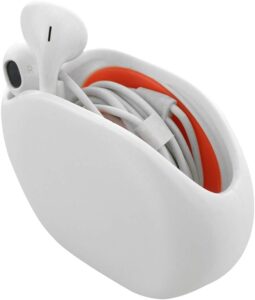
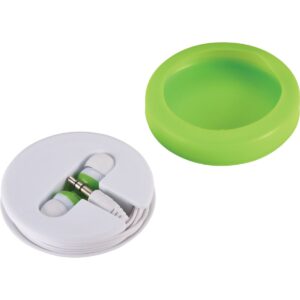
Today we will be learning about and starting our Earbud Case Project

  • Mrs. Moore will introduce this project and review how this project will be done.
  • Click HERE for this week's slide show that has the project info on slides 6-13.

After Mrs. Moore has introduced the project she will be calling students back to review and their grade Week 8 work in their portfolios.


s

View Full Page

Welcome To Class!! 

Today we are working on on our Earbud Case Project.

  • Click HERE for this week's slide show that has the project info on slides 6-13.When your earbud falls out - Imgflip
  • Click HERE for a rubric that shows how this assignment will be graded.
View Full Page

Welcome to class!

Today in class we will work on our Earbud Case Project:

  • Click HERE for this week's slide show that has the project info on slides 6-13.
  • Click HERE for a rubric that shows how this assignment will be graded. 
View Full Page

Welcome to Class!

Today we are going to:

  • Review the engineering design process

  • Earbud Case Project - APPLYING the steps of the Engineering Design Process to CREATE a solution

View Full Page

Welcome to Class! 

  •  Your Presentation is Monday

  • Work to finish your Earbud Case Project  -   APPLYING the steps of the Engineering Design Process to CREATE a solution

  • Update your Portfolio for Week 9

View Full Page
Week 27 | March 10th - March 14th | Edit Week 10 - Rotate Days / Change Dates or Style [must be logged in]

 Welcome to Class!! Please start at the tables upfront. 

  • Prepare for Earbud Project Presentations
    • You will get time to finish/prepare presentations
  • Make sure Week 9 in your portfolio is complete
  • Start Week 10 in your portfolio
    • Add link to Earbud Project to today's date


View Full Page

Welcome to class - Please start at the tables. 

Today we are going to do the following:

  • Presentations of Earbud Case Projects
  • Talk about 3D printing and about our 3D printer

Then we will take a quick tour of our 3D Printer

      • Talk about TOLERENCES
        • Click HERE for the slideshow for TOLERNCES.

View Full Page

Welcome to Class!  Start at the tables up front. We are going to do the following today: 

  • Talk about 3D printing and about our 3D printer

Then we will take a quick tour of our 3D Printer

  • Talk about TOLERENCES
        • Click HERE for the slideshow for TOLERNCES.

View Full Page

Welcome to Class - Start in the chairs up front

Today we are going to review how to join parts in Fusion 360, using the three shapes we made this week.

Click HERE to access the slide show to review how to join parts in Fusion 306 start on slide 53 to slide 57.

  • Once you are done joining your components and making an exploded view of them then you need to update your portfolio with a sentence describing what we did in class today and add a google doc showing a picture of of your 3 components joined.

Spend the rest of the class working on you starting you Joinery Project using instructions on slides 55 and 56.

View Full Page

Welcome to Class!!  

Today we are finishing up our 3rd Quarter work.

  • Finish yesterday's joining block assignment and your 4 joinery project slides
  • Complete Week 10 comments
  • Earned free time to use as you choose!

View Full Page